If you are in the business of securing IT environments then make sure to read the following blog post and referenced white paper.
Recently I decided to dissect the structure of the default pages in AD FS 2.0 and see what can be done with creating slightly different look from its default look. I wanted to see what files control what areas in the UI and what can be done with minimum code changes.
I started working with one of the most common pages accessed in large implementation – the Home Realm Discovery page. As you probably know, the default look of this page is like this:
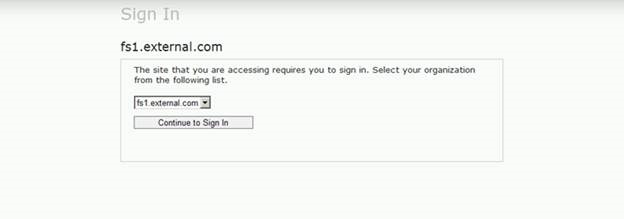
As part of this exercise I wanted to make it look like this:

The main page that is accessed to present Home Realm Discovery is HomeRealmDiscovery.aspx. So the first step I took a look at it to see what it is doing and if it using any other support pages. As I suspected, the site is designed to use different files for HTML, C# and CSS code. It also has special language files that contain all the configurable text strings in the UI. Some configuration is done via web.config file. Overall, to move from the default UI to my customized UI I had to modify six files and introduce two graphic files.
The following files have control over the Home Realm Discovery:
- Inetpub\adfs\ls\web.config
- Inetpub\adfs\ls \HomeRealmDiscovery.aspx
- Inetpub\adfs\ls \HomeRealmDiscovery.aspx.cs
- Inetpub\adfs\ls\App_GlobalResources\CommonResources.resx
- Inetpub\adfs\ls\App_GlobalResources\CommonResources.en.resx (and many other language files, if you need to present it in those languages)
- Inetpub\adfs\ls\MasterPages\StyleSheet.css
- Inetpub\adfs\ls\MasterPages\MasterPage.master
- Inetpub\adfs\ls\MasterPages\MasterPage.master.cs
Files with .CS extension contain C# code and I did not change them. All the logic associated with proper functionality of the AD FS for presenting the target IdPs, and other AD FS related functionality is done via those pages, but they are not controlling the UI for the Home Realm Discovery page.
On the following diagram I’ll point out what area in the Home Realm Discovery page is controlled by what configuration file.
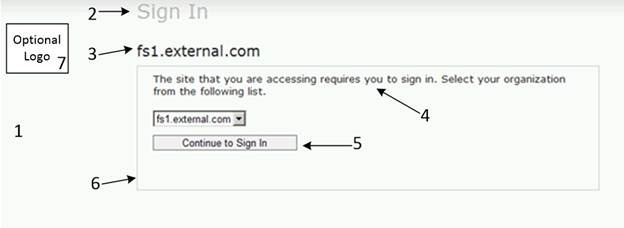
1. The background. It is controlled via StyleSheet.css. To modify it you’ll need to modify background-image: in BODY section. By default it is using url(../App_Themes/Default/header_background.png) image. You can replace this with another image of your liking to show in the background. Image can introduce nice color change with shades and such, but you can also just specify the solid color via the tag.
2. Header. The text for the header comes from the CommonResouces files. How it is viewed is controlled by the StyleSheet.css and MasterPage.master files. I replaced the default “Sign In” text with “Contoso Federation Services”, changes style sheet to reflect different font color and its size, tags in style sheet were also used to fine tune its placement. I also had to move its location in the MasterPage.master file so it would appear to the right of the logo, and not above it.
3. STS Title. The title you see here comes from the AD FS Federation Service name you define on the AD FS Properties. The same name you see in the drop down list when you need to select your target IdP. The placement code for STS Title is controlled in MasterPage.master and via style sheet. I removed STS Title from the final page. I had to do this by introducing a new code in the style sheet and replacing the class definition in the MasterPage.master with new style that hides it.
4. The text shown inside the main area comes from the CommonResouces files. The code that defines its placement is controlled via HomeRealmDiscovery.aspx file. You’d need to introduce new sections in it with new Label Text ID and create corresponding Label Text entries in the corresponding CommonResouces files.
5. Text in the button is controlled via CommonResouces files. Its placement can be controlled via HomeRealmDiscovery.aspx file and visual elements via style sheet.
6. The border is controlled via style sheet. Elements like its sickness, colour, how wide etc
7. Optional Logo can be introduced by specifying it via web.config file. Its placement on the page is controlled via the MasterPage.master file and style sheet.
Easy! Right?
OK, so if you like to see more details, here is a bit more on the each change to get from default look to my custom look.
1. Background. Modify StyleSheet.css from this:
body
{
background-color: #ffffff;
color:#222222;
font-size: 0.8em;
font-weight: normal;
font-family: “Segoe UI”, Verdana, Tahoma, Arial, sans-serif;
margin: 0px;
background-repeat: repeat-x;
background-image: url(../App_Themes/Default/header_background.png);
}
To this:
body
{
background-color: #ffffff;
color:#222222;
font-size: 0.8em;
font-weight: normal;
font-family: “Segoe UI”, Verdana, Tahoma, Arial, sans-serif;
margin: 0px;
background-repeat: repeat-x;
background-image: url(../App_Themes/Default/custombackground.gif);
}
2. Header. First, in MasterPage.master move the following code
<div class=”Header”>
<asp:Label ID=”PageTitleLabel” runat=”server”></asp:Label>
</div>
From being in front of the
<%
string logoPath =
System.Web.Configuration.WebConfigurationManager.AppSettings[ “logo” ];
if( !String.IsNullOrEmpty( logoPath ) )
{
%>
<div class=”GroupXLargeMargin”>
<img src=”<%= logoPath %>” alt=”logo” />
</div>
<%
}
%>
To be behind it, so it looks like this:
<%
string logoPath =
System.Web.Configuration.WebConfigurationManager.AppSettings[ “logo” ];
if( !String.IsNullOrEmpty( logoPath ) )
{
%>
<div class=”GroupXLargeMargin”>
<img src=”<%= logoPath %>” alt=”logo” />
</div>
<%
}
%>
<div class=”Header”>
<asp:Label ID=”PageTitleLabel” runat=”server”></asp:Label>
</div>
Second, update StyleSheet.css Header to look like this:
.Header
{
color: #000000;
padding: 8px 0 5px 0;
margin-bottom: 1px;
font-size: 200%;
font-weight:bold;
position:relative;
left:184px;
top:-95px;
}
And finally, replace “Sign In” text in both CommonResouces files for HomeRealmDiscovery text label to be “Contoso Federation Services”.
3. STS Title. To hide it you can do the following:
a. In MasterPage.master page change the following code
<div class=”TextSizeXLarge”>
<asp:Label ID=”STSLabel” runat=”server”></asp:Label>
</div>
To look like this:
<div class=”STSTitleNotVisible”>
<asp:Label ID=”STSLabel” runat=”server”></asp:Label>
</div>
b. In StyleSheet.css create new code for STSTitleNotVisible to be this:
.STSTitleNotVisible
{
visibility:hidden;
}
4. To introduce new text in the main section update HomeRealmDiscovery.aspx file with new Label Texts and introduce that text to the CommonResouces files.
a. In HomeRealmDiscovery.aspx make <asp:Content section to look like this:
<asp:Content ID=”Content1″ ContentPlaceHolderID=”ContentPlaceHolder1″ Runat=”Server”>
<div class=”GroupXLargeMargin”>
<asp:Label Text=”<%$ Resources:CommonResources, HomeRealmSelectionText%>” runat=”server” />
</div>
<div class=”GroupXLargeMargin”>
<asp:Label Text=”<%$ Resources:CommonResources, HomeRealmSelectionTextTwo%>” runat=”server” />
</div>
<div class=”GroupXXLargeMargin”>
<asp:DropDownList ID=”PassiveIdentityProvidersDropDownList” DataTextField=”Name” DataValueField=”Id” runat=”server”></asp:DropDownList>
<asp:Button runat=”server” ID=”PassiveSignInButton” Text=”<%$ Resources:CommonResources, HomeRealmSignInButtonText%>” EnableViewState=”False”
OnClick=”PassiveSignInButton_Click” CssClass=”Resizable”/>
</div>
<div class=”GroupXLargeMargin”>
<asp:Label Text=”<%$ Resources:CommonResources, HomeRealmSelectionTextThree%>” runat=”server” />
<a href=”mailto:Helpdesk@contoso.com?subject=FEDERATION”>Helpdesk@contoso.com</a>
<asp:Label Text=”<%$ Resources:CommonResources, HomeRealmSelectionTextThreeHalf%>” runat=”server” />
</div>
<div class=”GroupXLargeMargin”>
<asp:Label Text=”<%$ Resources:CommonResources, HomeRealmSelectionTextFour%>” runat=”server” />
</div>
</asp:Content>
b. Add the following to the CommonResouces files:
<data name=”HomeRealmSelectionTextTwo” xml:space=”preserve”>
<value>NOTE: The following Identity Providers will let you into the application.</value>
</data>
<data name=”HomeRealmSelectionTextThree” xml:space=”preserve”>
<value>If your Organization is not listed, please send an e-mail to the contact at </value>
</data>
<data name=”HomeRealmSelectionTextThreeHalf” xml:space=”preserve”>
<value>and express your interest of your Organization becoming a member of the Federation Framework, and include the name of the application that you are trying to access in your e-mail.</value>
</data>
<data name=”HomeRealmSelectionTextFour” xml:space=”preserve”>
<value>If you believe that you have arrived at this page by accident, please close your web browser and try accessing the application webpage URL again in a new browser session.</value>
</data>
5. The button is moved to be at the same level as the drop down list. This is controlled by removing <div> tags that surround the button code in the HomeRealmDiscovery.aspx.
6. To control the border just change the style sheet .MainActionContainer with this details:
.MainActionContainer
{
padding: 5px 20px 5px 20px;
border: solid 3px #003300;
min-height: 150px;
position:relative;
top:-30px;
}
7. Finally, to add the logo do the following:
a. Modify web.config file by uncommenting code that specifies the name of the logo file and then place your logo file in the root folder of AD FS (Inetpub\adfs\ls\)
b. In MasterPage.master change the following code
<div class=”GroupXLargeMargin”>
<img src=”<%= logoPath %>” alt=”logo” />
</div>
To look like this:
<div class=”CustomLogo”>
<img src=”<%= logoPath %>” alt=”logo” />
</div>
c. And finally, add new code to the StyleSheet.css:
.CustomLogo
{
margin-top:25px;
}
After doing all these changes, the default looking page

Will look like this:
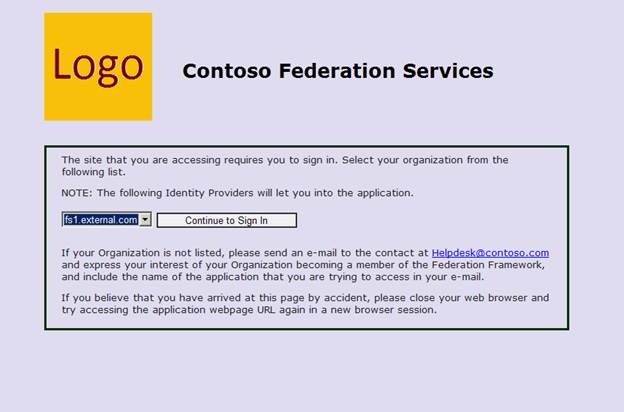
Easy, Breezy, Cover…. Hmm, page.
Till next time!
A few month ago I learned something about claims based authentication that I thought was not possible.
Ever since starting working on federation solutions, and learning about it via training courses, reading white papers, specifications and presentations the following two topologies were always shown or discussed. The first one is where company has its own STS and their applications configured with this STS. The second solution extends on the first one by federation between two STSs, where one STS is acting as RP and the second is acting as IdP. I have never seen any specs or designs that would show more than two STSs in a chain, ie something like this RP-RP-IdP. So for some time I was assuming that protocols that make it all happen (WS-Fed, SAML etc) are designed to work in specific model RP-IdP and would not go beyond this one-one relationship. While this works for majority of the real world situations, in some cases it does not satisfy the complex requirements where chaining of the multiple STSs is required. Well, I thought that it was not possible till a few month ago. I had to design complex federation architecture and this perceived limitation was giving me a lot of headache. So, obviously I did some research and talked to a few people who also specializes in federation solutions and to my great surprise I learned that there is no limitation with protocols and that it is just fine to setup multiple STSs in a chain of trusts. I wish that I learned it prior from someone else’s design or spec paper, clearly stating that it is fine to do this and it will work. Needless to say, we were able to configure our architecture and satisfy customer requirements without additional overhead and keep it very streamlined.
A few days ago I was rebuilding my lab and decided to configure it to illustrate chaining of multiple STSs and show it here. So if anyone else didn’t decipher it in spec papers or other design, and is thinking that chaining is not possible, that it is in fact possible and works just fine. You can use it in your designs if it is a requirement.
In my lab I configured the following to illustrate this configuration:
- IdP STS (DC, AD FS 2.0), it has the following FS URL: fs1.contoso.com
- RP STS (AD FS 2.0), this is a middle STS, with FS URL: fs2.contoso.com
- RP STS (AD FS 2.0), this is the STS with target relying party application. FS URL: fs1.external.com
- Relying Party (Sample WIF SDK app). This is a workgroup server configured with fs1.external.com as its STS. Application URL https://myclaims.external.com/myclaims
- Workstation that will access the application. I have HTTPWatch installed on this PC to show all traffic passive request traffic between the browser and the target systems.
Figure 1 shows my lab configuration:

Figure 1: Chaining multiple STS
Figure 2 shows the HTTPWatch traffic captured on the client PC. As you can see in steps 1 to 10, the browser steps through all parties in the authentication process and authenticates me into the application. It is fairly self explanatory, but if you have questions then let me know if you need any explanation on what happens here.

Figure 2: HTTPWatch capture of the Passive Request traffic with multiple chained STS (click on it to see it large)
Finally, you might ask why would anyone need to chain STS in such way. To answer it I’ll have to write another blog post. So stay tuned, I might do that in the next month or so.
Thanks, Dmitrii
Authentication Mechanism Assurance is described in the following Microsoft publication: http://technet.microsoft.com/en-us/library/dd378897(v=WS.10).aspx.
In this post I want to dig a bit more into different configuration options, show how it works and provide example of how it can be configured with AD FS 2.
Authentication Mechanism Assurance is a new feature in Windows 2008 R2 AD DS configured at 2008 R2 Functional level, it provides an ability to assure that user is authenticated with specific type of certificate. Usually it is used to assure that user is authenticated with a specific type of smart card into AD DS. This assurance can then be passed on to applications which will make authorization decision on what user can or cannot do in it. It is very important feature in environments where specific regulations require to provide assurance of Smart Card authentication.
AD DS configured to use Authentication Mechanism Assurance is capable to identify users who used specific type of Smart Cards for authentication and dynamically populate their Kerberos tickets with security group associated with those specific Smart Cards. The linkage between Smart Card and AD DS is done via the OID populated in Certificate Policy certificate extension. Let’s take a quick look at how it works. The following diagram shows a basic flow of authentication to claims based application which can take advantage of the authentication assurance claim. In our example Contoso has Smart Cards with X.X.XX.XXX.X.X.X.X OID populated in Certificate Policy certificate extension. AD DS is configured to link X.X.XX.XXX.X.X.X.X OID with “Smart Card X Authenticated” security group.
In step 1, user authenticates to their desktop by providing Smart Card and PIN number. During authentication process AD DS detects that user authenticates with Smart Card (it is done by finding X.X.XX.XXX.X.X.X.X OID in the user certs) and builds Kerberos ticket. AD DS will include “Smart Card X Authenticated” security group SID in the Kerberos ticket.
In step 2, user tries to access claims based application which will redirect the browser to its trusted STS.
In step 3 and 4 user will be authenticated to the STS. STS will examine user group membership and because user’s Kerberos ticket contains “Smart Card X Authenticated” SID it will issue special claim type indicating that user was authenticated to AD DS with their Smart Card.
This token will be passed to the application. In step 5, application will have a choice to provide different logic for users who authenticated to AD DS with a Smart Card or without. Simple enough.

Let’s take a look how it all can be configured. I’m not going to repeat some of the steps described in the before mentioned Microsoft publication. I’ll refer to it when necessary.
The first step in configuring Authentication Mechanism Assurance is to create proper Issuance Policy in AD DS. The OID in AD DS Issuance Policy must match the OID in Certificate Policy on the Authentication certificate on the Smart Card. It will look something like this on the certificate:
[1]Certificate Policy:
Policy Identifier=X.XX.XXX.X.XXX.X.X.X.X.XX
More likely your AD DS will not have this OID and you’ll need to create one. Fortunately it is easy to do:
- Open Certificate Template management console.
- Open any v2 certificate template.
- Click on Extensions Tab, Click on “Issuance Policies” and then click Edit.
- Click on Add, then click on New.
- In the Name field type: Smart Card AuthN Cert
- In the object identifier field type: X.XX.XXX.X.XXX.X.X.X.X.XX (where XXX – is the OID from the cert on Smart Card)
- Click OK
- Do not save changes to the certificate template. Exit Certificate Management Console.
At this point you are ready to link appropriate security group to the Certificate Issuance policy. Create get-IssuancePolicy.ps1 and set-IssuancePolicyToGroupLink.ps1 files as described in Microsoft article. Run the first one to see if there are policies already in place. Run the second to make the linkage.
To display run this: .\get-IssuancePolicy.ps1 –LinkedToGroup:All
To create new policy: .\set-IssuancePolicyToGroupLink.ps1 –IssuancePolicyName “Smart Card AuthN Cert” –groupOU “Auth Mech Assurance” –groupName “Smart Card Authenticated”
To see new policy: .\get-IssuancePolicy.ps1 –LinkedToGroup:All
So far, so good. We configured Authentication Mechanism Assurance. To verify that it actually working logon to AD DS with Smart Card, open command prompt and type whoami /groups. It will list all the groups that you belong, one of them will be Smart Card Authenticated. Logon with UserID/pwd and you’ll not be member of that group.
The next step is really making some use out of this information. Applications must be designed to take advantage of this information and make authorization decisions based on level of assurance we provide to it. Perfect candidates for it are claims based applications. We can generate a claim type, for example lets name it “LOA”, which stands for Level of Assurance, and assign different value to it. If user used userID/pwd, we assign 2 to LOA, if user used Smart Card then LOA will have 3. Application will decide what to do base on those values in LOA claim type.
Next, we are going to create LOA claim type in AD FS 2 and pass it to the application. I’ll discuss it in the next post.
Thanks for stopping by.
Authentication Mechanism Assurance is described in the following Microsoft publication: http://technet.microsoft.com/en-us/library/dd378897(v=WS.10).aspx.
In this post I want to dig a bit more into different configuration options, show how it works and provide example of how it can be configured with AD FS 2.
Authentication Mechanism Assurance is a new feature in Windows 2008 R2 AD DS configured at 2008 R2 Functional level, it provides an ability to assure that user is authenticated with specific type of certificate. Usually it is used to assure that user is authenticated with a specific type of smart card into AD DS. This assurance can then be passed on to applications which will make authorization decision on what user can or cannot do in it. It is very important feature in environments where specific regulations require to provide assurance of Smart Card authentication.
AD DS configured to use Authentication Mechanism Assurance is capable to identify users who used specific type of Smart Cards for authentication and dynamically populate their Kerberos tickets with security group associated with those specific Smart Cards. The linkage between Smart Card and AD DS is done via the OID populated in Certificate Policy certificate extension. Let’s take a quick look at how it works. The following diagram shows a basic flow of authentication to claims based application which can take advantage of the authentication assurance claim. In our example Contoso has Smart Cards with X.X.XX.XXX.X.X.X.X OID populated in Certificate Policy certificate extension. AD DS is configured to link X.X.XX.XXX.X.X.X.X OID with “Smart Card X Authenticated” security group.
In step 1, user authenticates to their desktop by providing Smart Card and PIN number. During authentication process AD DS detects that user authenticates with Smart Card (it is done by finding X.X.XX.XXX.X.X.X.X OID in the user certs) and builds Kerberos ticket. AD DS will include “Smart Card X Authenticated” security group SID in the Kerberos ticket.
In step 2, user tries to access claims based application which will redirect the browser to its trusted STS.
In step 3 and 4 user will be authenticated to the STS. STS will examine user group membership and because user’s Kerberos ticket contains “Smart Card X Authenticated” SID it will issue special claim type indicating that user was authenticated to AD DS with their Smart Card.
This token will be passed to the application. In step 5, application will have a choice to provide different logic for users who authenticated to AD DS with a Smart Card or without. Simple enough.

Let’s take a look how it all can be configured. I’m not going to repeat some of the steps described in the before mentioned Microsoft publication. I’ll refer to it when necessary.
The first step in configuring Authentication Mechanism Assurance is to create proper Issuance Policy in AD DS. The OID in AD DS Issuance Policy must match the OID in Certificate Policy on the Authentication certificate on the Smart Card. It will look something like this on the certificate:
[1]Certificate Policy:
Policy Identifier=X.XX.XXX.X.XXX.X.X.X.X.XX
More likely your AD DS will not have this OID and you’ll need to create one. Fortunately it is easy to do:
- Open Certificate Template management console.
- Open any v2 certificate template.
- Click on Extensions Tab, Click on “Issuance Policies” and then click Edit.
- Click on Add, then click on New.
- In the Name field type: Smart Card AuthN Cert
- In the object identifier field type: X.XX.XXX.X.XXX.X.X.X.X.XX (where XXX – is the OID from the cert on Smart Card)
- Click OK
- Do not save changes to the certificate template. Exit Certificate Management Console.
At this point you are ready to link appropriate security group to the Certificate Issuance policy. Create get-IssuancePolicy.ps1 and set-IssuancePolicyToGroupLink.ps1 files as described in Microsoft article. Run the first one to see if there are policies already in place. Run the second to make the linkage.
To display run this: .\get-IssuancePolicy.ps1 –LinkedToGroup:All
To create new policy: .\set-IssuancePolicyToGroupLink.ps1 –IssuancePolicyName “Smart Card AuthN Cert” –groupOU “Auth Mech Assurance” –groupName “Smart Card Authenticated”
To see new policy: .\get-IssuancePolicy.ps1 –LinkedToGroup:All
So far, so good. We configured Authentication Mechanism Assurance. To verify that it actually working logon to AD DS with Smart Card, open command prompt and type whoami /groups. It will list all the groups that you belong, one of them will be Smart Card Authenticated. Logon with UserID/pwd and you’ll not be member of that group.
The next step is really making some use out of this information. Applications must be designed to take advantage of this information and make authorization decisions based on level of assurance we provide to it. Perfect candidates for it are claims based applications. We can generate a claim type, for example lets name it “LOA”, which stands for Level of Assurance, and assign different value to it. If user used userID/pwd, we assign 2 to LOA, if user used Smart Card then LOA will have 3. Application will decide what to do base on those values in LOA claim type.
Next, we are going to create LOA claim type in AD FS 2 and pass it to the application. I’ll discuss it in the next post.
My last few posts were dedicated to customization of the look and feel of the UAG 2010 Logon/Logoff and Portal experience. I had to figure out a lot of it on my own without any type of documentation. Well, there is a good news, PACKT Publishing just released a new book on how to customize UAG implementation. It is written by the same folks who wrote a must have book on UAG Administration, and published from the same publisher. If you are doing any work with UAG 2010 then both of these books should be in your library!
I just had a chance to read through the new book. It covers a lot of different topics and shows how to customize UAG installation, and at the same time keep it in supported condition.
You can check it out at the publisher web site http://www.packtpub.com/mastering-microsoft-forefront-uag-2010-customization/book
Ever needed to modify UAG 2010 default Logon/Logoff pages to something a bit more custom? I did on one of my recent projects.
See it for more details on full width page on my blog at http://cloudidentityblog.com/white-papers/uag-2010-custom-logon-and-logoff-pages/
Thanks,
Dmitrii
Ever needed to modify UAG 2010 default portal page to something a bit more custom? I did on one of my recent projects.
See it for more details on full width page on my blog at http://cloudidentityblog.com/white-papers/uag-2010-custom-portal/
Thanks!
In the last nine posts we reviewed different topologies and discussed some of the techniques on how to integrate these topologies together. In this post we’ll take a look at real example of a production implementation.
The solution very similar to the following design has been implemented by one of the large enterprise companies. We will review it here in some detail. Every real world implementation is based on some type of specific requirements that the customer would like to satisfy. The solution is called “Application Gateway” or simply “Gateway”. The following are the main requirements that this solution must satisfy:
- Provide a secure infrastructure solution that can be accessed by users over the Internet.
- Provide an application portal to host applications for access by both internal and external users.
- Allow external users to create accounts.
- Allow external users to change their passwords.
- Provide external users with self-service password reset functionality.
- Allow internal users to leverage their current existing credentials for gaining access to the resources in this solution.
- Federated access to published applications by partner users.
- The solution must be secure, implemented in the DMZ environment, and ideally without Windows trusts between this solution environment and internal AD.
I just listed the main ones, but there are many more specific requirements. Those are not necessarily dictating the overall solution architecture.
The following software components are part of the solution, with Figure 1 showing how they relate to each other:
- FIM 2010 R2 – All IDM related functions
- Self-registration for external users
- SSPR for external users
- Group Management for application access AuthZ
- Approval Workflows for user creation
- UAG SP1 – External and Internal entry into the application hosting environment
- AD FS v2 – Authentication into the environment
- For external users access to SAML apps
- For internal users SSO to Gateway and access to SAML Apps
- SCOM/ACS – Monitoring and Audit
- AD – Directory Services

Figure 1: Solution Components
UAG Trunk Design in this solution will have at least three trunks on each UAG server, as shown in Figure 2.
- The first trunk will publish Anonymous applications. This trunk will be configured without any authentication requirements. The following are primary applications that will be published via this trunk:
- Initial landing page for users with menu selection of different tasks
- Self Service Password Reset application
- Self-User Registration application
- The second trunk will publish a portal for external users with password change function
- This trunk will use AD for primary authentication to the portal
- Will use AD FS as secondary for claims-enabled apps
- The third trunk will publish a portal for users authenticating via SAML (Federated)
- This trunk will use AD FS as the primary authentication to the portal
- It will be configured as a relaying party with RP-STS

Figure 2: UAG Trunks
Figure 3 shows Federation configuration for this solution. It will have at least three AD FS Farms:
- The first farm will act as resource provider, and it will be configured with all applications in the Gateway application environment. All claims-enabled applications will trust this STS. In Figure 23, it is shown as RP-STS (fs2.fabrikam.com). As you can see, both UAG servers, specifically ADFS configured trunks, are some of the applications that are configured as relying parties with this RP-STS.
- The second AD FS server farm will provide SAML tokens to external users with accounts in the Gateway Active Directory. It will act as an identity provider to external users who have accounts in the Gateway AD. This STS is shown as IdP-STS (fs1.fabrikam.com). This STS will not be accessed via UAG as by means of UAG proxy. Instead it will be published on the FBA trunk as a secondary authentication provider.
- The third AD FS server farm will provide SAML tokens to internal users with accounts in Corporate Fabrikam AD. It will act as an identity provider to internal users. This STS is shown as IdP-STS (fs3.fabrikam.com). This STS is not published via UAG. In fact, it is providing Federated WebSSO to the RP-STS, so that internal Fabrikam users will be able to authenticate into the Gateway environment without being required to have a known UserID/Password in the Gateway AD.

Figure 3: Federation Design
At this point, we need to review a very important technical requirement that must be satisfied for this solution to work. Internet facing UAG and internally exposed UAG must be resolved via the same DNS name. They must be identical. In other words, if an Internet based client types in the browser the name for this portal as portal.fabrikam.com, it should resolve to the external UAG IP address. At the same time, if internal user, using a computer on the corporate network is using the same URL, it should be resolved to the internal UAG server IP address. Why is this the case? It actually has nothing to do with UAG. This requirement comes from AD FS – the federation service URL always stays the same. In our example, if the client needs to get a SAML token from the fs2.fabrikam.com AD FS server, it must be able to resolve this URL and connect to it via that URL. Since this FS service is published via two different UAG servers, both sides of the users must be able access it via the same URL.
The easiest and most common way to satisfy this requirement is by having “split-brain” or dual zone DNS design. Basically, companies would have two different zones with the same name, one exposed to the Internet and one that is only internal. Figure 4 gives a visual demonstration of this requirement.

Figure 4: Split brain dual zone DNS design
Let’s review how different users would authenticate into the Gateway and access published applications. First, we will start with internally based users. Figure 5 provides a high level flow of how internal users will authenticate to the internal UAG server. For internal users whose domain was federated with Gateway, they will use the ADFS trunk as their primary portal. When they try to authenticate, they will be using Federated WebSSO, with first step (1a) accessing RP-STS and performing a home realm discovery, which will redirect them to their internal IDP-STS in step 1b, where they get their initial SAML token, which will be provided back to RP-STS (step 1c). RP-STS will issue the final token, which the client will provide to the ADFS trunk (step 1d), and the user is authenticated to the portal.

Figure 5: Internal user authentication to UAG
After successful authentication, the user will see a list of applications published to him via the AD FS trunk. The authorization to see these applications must be done via contents of the claims. Using normal security groups from Gateway AD will no longer work because the internal user actually does not use Gateway AD for authentication to the portal.
There are two types of applications that are supported via AD FS enabled trunks: Kerberos Applications and Claims-enabled applications.
In this solution, FIM 2010 R2 must be published to the internal users so they can get into the FIM 2010 R2 portal and perform administrative tasks, such as approve or deny external user account requests. FIM R2 is not a claims-enabled application, but it is a Kerberos based application and it can be published via AD FS enabled trunk by using Kerberos Constrained Delegation. Of course for this to work, the Gateway AD must have a shadow account for internal users. FIM R2 will actually help with creating shadow accounts. It is configured to synchronize internal Fabrikam AD user accounts into the Gateway AD, thus creating a shadow account for internal users. It will not synchronize user passwords into Gateway AD.
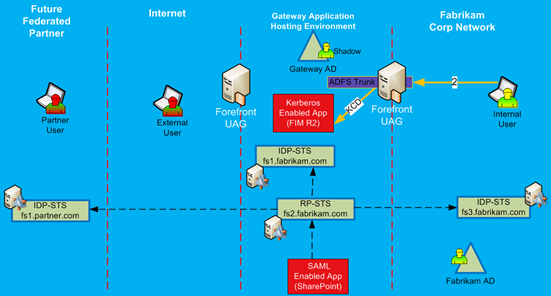
Figure 6: Internal user accessing Kerberos Applications
Internal users will be able to access FIM R2 via SSO experience and perform their work as needed. Figure 6 shows the basic authentication step for Kerberos based application. In the future, this solution will be able to publish other Kerberos based applications, and they will be accessed in the same way as FIM 2010 R2. They will require proper SPN configuration and Gateway AD, but users will already have shadow accounts.
The other type of applications that can be published via AD FS enabled trunks are claims-based applications. These are easy and straight forward to publish and access via AD FS trunk. Figure 7 provides a high level authentication flow for internal users.
The interesting part in this authentication flow and what is different from the original authentication to the portal itself is the fact that the client does not need to get another security token from its internal IdP-STS. Since he is already authenticated to the portal, after the client tries to access the published application, the client browser will only need to request a new security token from RP-STS, specific for this application, as it shown in Figure 7.

Figure 7: Internal user accessing claims applications
Finally, we can examine authentication flow and application access by external users. There will be two types of external users: users with accounts registered in the Gateway AD for which they know their passwords and federated users, whose identity belongs to some other organization. Each user type will have to use different trunks for authentication.
External users with accounts in Gateway AD will be accessing it by using a UAG trunk with Gateway AD as the primary authentication provider. The primary reason for this configuration is to allow these users to change their passwords and to notify them when their password is about to expire. Trunks that use AD FS as the primary authentication provider do not provide password management functions.
Federated external users will access the portal via UAG trunks with the AD FS server as the primary authentication provider. While these users are important to the future of this solution, the current primary user base will consist of external users with accounts in Gateway AD, and, for this reason, Figure 29 shows the authentication flow and access to applications for these types of users only.
First, the user will need to authenticate into the portal, which will be done via UAG forms based authentication with Gateway AD account. After successful authentication into the portal, the user will be presented with a list of applications, which he/she has been authorized to access. The authorization is based on the AD group membership. The authentication flow to the application will depend on the application type.
Non-claims enabled applications are actually very straightforward. For example, FIM 2010 R2 will be published to external users by using SSO function of the UAG trunks, and it will use the same authentication provider as for the trunk itself. Users will access such applications by utilizing their AD credentials, with UAG taking care of this authentication behind the scenes and without any special type of configuration requirements. This flow is shown as step 2 to Kerberos enabled applications.
Authentication to claims-enabled applications will be a bit more complex. Figure 8 shows it with step 3 flow. The application is published via the FBA trunk portal, and the user will try to access it via that portal. With step 3a, it will contact the application and learn that the application trusts RP-STS. RP-STS is not published via FBA trunk. It is published via ADFS Trunk, a different trunk on the UAG server. In step 3b, the user’s browser will be redirected to the RP-STS to get the token for the target application. Theoretically, we could issue a SAML token at this point in time, but since RP-STS is not published via an FBA Trunk, we will not be able to provide SSO experience to the end user. If we would end the process here, the user would be required to authenticate to RP-STS. Since there is no SSO for this user on the ADFS trunk, he/she will be prompted for credentials. Instead, the Home Realm Discovery will happen, and the user will be redirected to the IdP-STS (fs1.fabrikam.com). IdP-STS is published on the FBA trunk, and it is configured with SSO authentication via Gateway AD. The user is already authenticated to the FBA trunk and via step 3c will authenticate to the IdP-STS and receive security token. This token will be posted back to the RP-STS in step 3d, which will be transformed into a new token, suitable for the target application. It will be provided back to the client computer and posted to the application via FBA trunk in step 3e. The application will authenticate the user and open in the user’s browser.

Figure 8: External User Authentication and Application Access
It is not the most straightforward authentication experience, but as discussed earlier in this paper, configuration of claims-based applications with multiple UAG trunks requires separation between Resource Provider STS and Identity provider STS. Otherwise it will not be published via different UAG trunks.
Authentication of a federated user via an external UAG server is done the same way. It is for internal Fabrikam users, straight forward federated WebSSO.
Things to know about this design:
During the implementation of this solution, we discovered a few restrictions in AD FS that would not be very obvious if we used only one UAG server. However with dual implementation and especially with identical name spaces on Internet and Intranet, we ran into some minor constraints. Fortunately, fairly easy workaround were quickly identified to bypass them.
The first constraint is related to the certificate usage on AD FS. It will not allow the use of the same certificate (certificate with the same hash) on multiple relying parties. Why is this a problem? Since we have the identical name space on the internal network and external network, originally we tried to save on costs and use the same wild card certificate (*.fabrikam.com) on external UAG and internal UAG servers. UAG servers will work just fine with the same cert, but when time came to set them up as relying parties on the AD FS RP-STS server, we encountered a problem. AD FS did not allow the creation of the second relying party with a certificate whose hash had already been used by another relying party. The simple solution to get around this problem is to issue two different wild card certificates, one for internal UAG and one for external UAG. Usually these certificates must be trusted by Internet clients, so you would need to get them from one of the commercial certificate providers, and it will double your cost.
The second constraint is related to the naming of the ADFS Trunks on external and internal UAG servers and the potential conflict with RP-STS Federation Services for each relying party. During ADFS trunk configuration on the UAG server, it is most logical to configure the public URL for the trunk to match the URL of the published Federation server. By default, you would probably create the ADFS trunk for fs2.fabrikam.com AD FS with the same URL, i.e. it will be fs2.fabrikam.com. Then you would proceed to configure AD FS with the UAG relying party, which will configure it with the Federation Service URL as fs2.fabrikam.com. So far so good, we have no issues. Now, we proceed with the configuration of the second UAG server, where we create the UAG trunk for internal users, with the same URL, to match RP-STS, ie, fs2.fabrikam.com. This is done without any issues on the UAG server. The second step in configuration will be the creation of the relying party trust on the AD FS server. AD FS will not allow you to create the relying party trust to the second UAG server. This is because it is using the same URL as the first one, and AD FS will not allow two relaying parties with the same URL. Fortunately, there is a workaround for this as well. All you need to do is to configure each ADFS trunk with its own unique URL, different from the RP-STS URL. For example, the external UAG AD FS Trunk can be configured with the following URL for its public name: fs2e.fabrikam.com, and internal UAG AD FS trunk can be configured with the following URL for its public name: fs2i.fabrikam.com. When configuring each UAG server with RP-STS, they will appear as different relying parties, and AD FS will be happy. One thing to remember is to make sure that DNS is configured to resolve fs2.fabrikam.com to each respective UAG trunk, i.e. it needs to point to the same IP address as its internal or external public trunks URLs.
Thanks!
 Security and Identity in the Cloud