In my prior two posts I demonstrated how WAAD can be configured as IdP. In this post we document this on paper. The configuration is very simple, but so far I could not find it documented anywhere, so here it is for anyone interested.
In first scenario we will configure WAAD as IdP for Azure ACS. Like shown on this diagram:

To configure ACS as relying party in WAAD you need to do the following:
- Add new application in your WAAD tenant
- Name it whatever you like it
- For App URL:, put the following URL https://<your-acs-name>.accesscontrol.windows.net/ , where <your-acs-name> is the name of the ACS you created in your Azure subscription.
- For App ID URI:, put the same URL as in previous step.
- Save configuration.
Of course you’ll need to add WAAD in ACS as IdP as well.
In second scenario we will configure WAAD as IdP for AD FS. Like shown on this diagram:
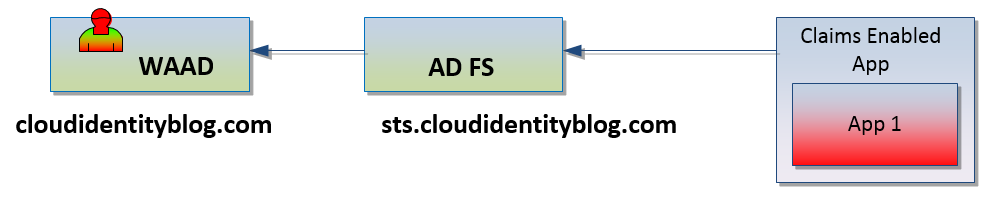
To configure AD FS as relying party in WAAD you need to do the following:
- Add new application in your WAAD tenant
- Name it whatever you like it
- For App URL:, put the following URL https://<your-sts-dns-name>/adfs/ls/ , where <your-sts-dns-name> is the URL for your AD FS server (for example sts.cloudidentityblog.com)
- For App ID URI:, put the following http://<your-sts-dns-name>/adfs/services/trust, where <your-sts-dns-name> is the URL for your AD FS server (for example sts.cloudidentityblog.com).
- Save configuration.
Of course you’ll need to add WAAD in AD FS as IdP as well.
There is no mechanism to configure WAAD as to what type of claims it will provide to RP. It is hard coded to provide half a dozen claims for the user. If you need to get information about the user that is not passed via claims you’ll have to use Graph API to query WAAD and find that information programmatically (your app will have to do this).
So I’m somewhat on the roll here and last night recorded another quick thirty minutes demonstration for you guys. This one is very similar to the last one, we are still using Azure AD as an Identity Provider, but this time we putting Access Control Service between AAD and ADFS/ application. Just like on this diagram.
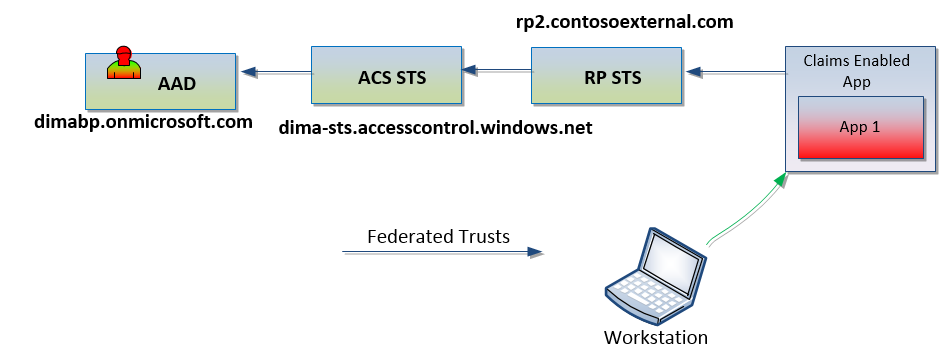
So if you want to see how it works and more importantly how it can be configured then check out my latest video. Make sure to watch it in full screen and HD. Have fun and let me know if you have any questions.
Thanks, Dmitrii Lezine.
In my previous post I showed to you how easy it is to configure Azure AD to act as Identity Provider to Relying Party applications via AD FS. There were questions about ability to configure applications directly with AAD. If it is possible and if it is, then why would anyone want to use AD FS in the middle. The answer is yes, of course it is possible to configure applications to work directly with AAD, in fact most of the AAD online documentation provides examples on how to do that. The second part of this, ok, since we can configure apps to work directly with AAD, why put AD FS in the middle? The simple fact is that not all applications will be configured directly with AAD, and there are a lot of applications that are already configured in some type of federated topology. Lets take a look at the following diagram, here we have hub/spoke environment with a few Identity Providers, central hub and a few applications. Users at each IdP are able to use applications via the central hub. The fact of the matter here is that those IdPs can be any compatible Security Token Service and those IdPs do not care how other IdP are configured. As long as IdP-HUB RP relationship is working, users will be able to access target applications.
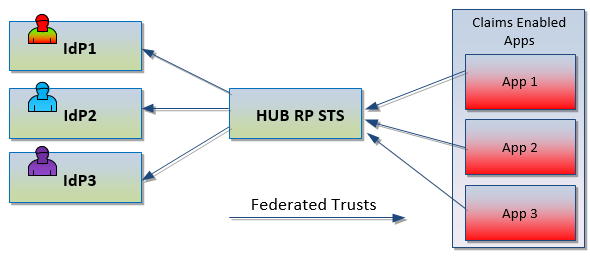
This design accommodates requirement to add any number of new Identity Providers and get them to access target applications. So if we have a new customer who uses AAD as their primary user directory and they need to get access to some existing apps, the primary solution would be to configure AAD as another IdP against our hub RP AD FS. Now users in AAD will be able to gain access to the applications. Hub RP claim rules can even transform incoming assertions from one claim type to another, to whatever is required by the target application.

Thanks for stopping by!
A few weeks ago I mentioned that I’d like to do a series of posts about different topologies and capabilities with claims based authentication. Well, I decided to start with one of the last from the list and show how we can use Azure Active Directory (AAD) as Identity Provider with AD FS being a Relying Party.
This demonstration shows the following topology:

User gains access to the claims enabled application with his identity coming from the Azure Active Directory. For better viewing experience make sure HD is ON and view it in full screen.
Azure Active Directory as IdP and AD FS as RP from Dmitrii on Vimeo.
Comments? Leave it below.
Once in a while I get a request from the Packt Publishing to review one of their new publications. Recently they published a new book Microsoft Forefront UAG Mobile Configuration Starter and asked me to take a look and see what I think. The title of the book has one important word – Starter, and I think that this book is a great starter for anyone who is not very familiar with UAG and wishes to use it as application publishing solution to clients with mobile devices. The book provides detailed steps by step instructions on how to configure UAG to publish SharePoint site and Exchange ActiveSync to mobile user population and provide some basic steps on configuration of Windows Phone 7.5 to access SharePoint and use built in Office apps. Probably the most interesting parts of the book are closer to the end when it starts to cover common application publishing scenarios, security and customization, but since this is a Configuration Starter, it only covers these areas at very high level and the majority of the book is devoted to the step by step instructions with a lot of screen shots, which are very useful if you are not familiar with the product.
So overall, if you have a requirement to publish applications to mobile devices and would like to use Microsoft UAG 2010 as reverse publishing solution then you will find this book very useful with initial implementation and evaluation of the product and it has a good number of references to other resources to get additional and more advanced information.
In case you have not seen this, Microsoft released SP3 for UAG 2010. Check out what’s new and download it here.
You have to install SP2 before installing SP3, these service packs are no cumulative.
 Security and Identity in the Cloud