In the last many posts we looked at all kind of different topologies for UAG and AD FS configuration.
Now, since we are armed with knowledge of different configuration options, we can put all of them to use and see how we can apply them to real life situations. Before we do this, we need to revisit some critical technical requirements that exist with UAG and ADFS v2.
- The UAG server can use the same AD FS v2 Federation Service URL only in one UAG trunk. This constraint is very important to understand because it is one of the critical elements that will affect your design.
- Based on the previous requirement, if your configuration requires multiple UAG trunks with AD FS v2 support, and we will examine shortly why this might be the case, you will need to implement a separate AD FS v2 server for each UAG trunk.
- UAG can provide Kerberos Constrained Delegation (KCD), but with the following constraints:
- The UAG server must be in the same AD domain as the application server it is trying to access;
- The User Account used to authenticate to the UAG server (the one we need to use KCD for) must be in the same AD Forest as the UAG server. If the user comes from a trusted AD Forest, the KCD will not work.
While designing your solution, you will have to gather a lot of requirements and understand the customer’s situation. Some requirements will force you into certain design topologies, and it is important to answer them at the beginning of the design process. There are at least three main questions that you have to answer when designing your UAG/ADFS access solution. The answers to these questions will direct you into a certain design topology or might require a combination.
The first question relates to password management. If you have a requirement to provide password management capabilities to remote users, -i.e. password change and notification of expiring password, you must use a UAG trunk that uses AD as the primary authentication provider. This type of trunk will authenticate you before providing access to any published applications. Access to claims based applications will be done via a secondary authentication to the back end published AD FS v2 server. This is the first topology that we discussed in the first part of this paper. Figure 1 shows this configuration.
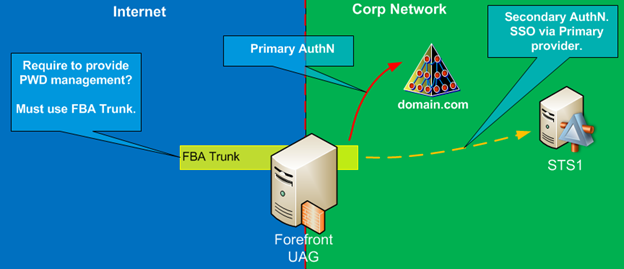
Figure 1: UAG with One Trunk and dedicated AD FS in each Trunk
The second question relates to strong authentication, i.e. Smart Card based authentication. If there is a requirement to provide Strong Authentication, then your remote access solution must have topology #2, with UAG trunk configured for Smart Card authentication against the Active Directory and the AD FS server configured as an authentication provider for the claims based application. Anytime there is a requirement to use Smart Card authentication on the UAG portal, it will consume at least one AD FS Federation Service. Since we cannot use the same trunk to provide authentication via AD UserID/Password and Strong Authentication, the configuration will have at least two UAG trunks. Figure 2 shows this configuration.
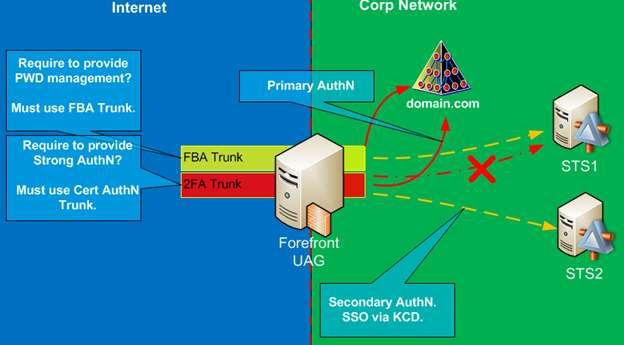
Figure 2: UAG with Two Trunks and dedicated AD FS in each Trunk
The third question relates to the federation requirements with other companies. We need to identify if there is a federation requirement with external partners, specifically with IDP partners, where your company provides application resource for their use. If there is none, then our solution encompasses topology #1 and/or #2. If you must support federation as RP STS, then it complicates things. UAG trunks used for FBA or Smart Card authentication will consume their AD FS Federation Services, and it cannot be used by another trunk on the same UAG server.
We must implement yet another AD FS Federation Service on the internal network. If you need to satisfy all three requirements, you will need to have at least three UAG trunks, each with its own dedicated AD FS v2 server. Figure 3 shows this configuration.

Figure 3: UAG with Three Trunks and dedicated AD FS in each Trunk
As you see in Figure 3, this is not a simple solution anymore. While we can use the same UAG server to publish all of these services and all kinds of applications, we must implement three separate AD FS services. However, this is not the end of the complications. There are still some critical design decisions that you must make. What is the ultimate goal of this solution? Yes, the goal is to publish applications to the end users. And what type of applications are we trying to publish via UAG/ADFS configuration? We are trying to publish claims based applications. Let’s think for a moment about configuration requirements for claims-based application. The first and foremost requirement is that it must be configured with a trusted Security Token Service. It must be able to accept security tokens from trusted STS for user authentication.
How would we need to configure the claims-based application with multiple AD FS v2 servers and multiple UAG trunks? The first logical way to look at it is by creating trusts between the target application and each STS. As shown in Figure 4, in such configuration each trunk will have its own AD FS server which will be able to issue security tokens to the application. The problem with this approach resides with Home Realm Discovery. If we configure the application to trust multiple STSs, we have to make some type of determination at the application level of where the user must authenticate to get the valid security token. We are taking Home Realm Discovery out of the AD FS realm and trying to do it at the application level. While theoretically it is possible, the reality is that applications are not designed to do Home Realm Discovery. The underlying Windows Identity Foundation service must be extended to provide this functionality, which is not very easy to do and, in most situations, is not the best practice. The goal behind claims based authentication is to simplify authentication and simplify the application developer’s life, thus outsourcing authentication related Home Realm Discovery functions to the services designed for this purpose. The bottom line is that setting the application with multiple STSs is not recommended, and it is not the best practice.
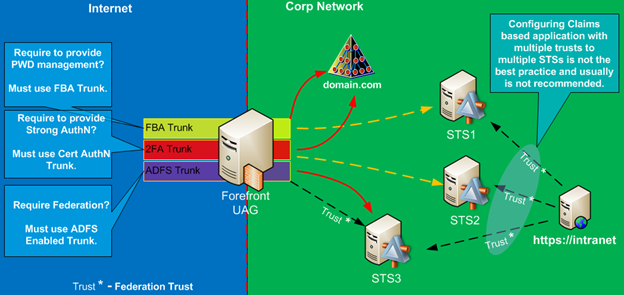
Figure 4: Application with multiple RP-STS
The other common way to configure claims-based application is with one STS. Usually it will be designated as the Resource Provider role (RP-STS) and let RP-STS issue all security tokens for this application. RP-STS will be required to route user requests destined for other Identity providers. In our configuration, one of the AD FSv2 servers will be acting in this role. Which one should it be? The STS published via federated UAG trunk, (i.e. with UAG acting as AD FS proxy,) is the right choice for RP-STS. The configuration is shown in Figure 5.
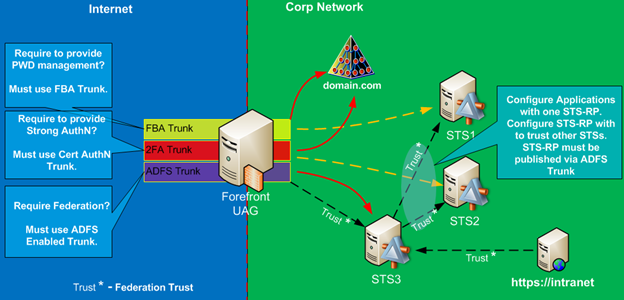
Figure 5: Application with dedicated RP-STS
This is a complex solution, but if you must have at least two UAG trunks with support for claims-based applications, this is the only viable choice to publish them.
In the next post we will take a look at a specific real world example of how UAG and AD FS can be used to publish applications.
This post discussing how it is possible to publish applications to Internet based users who authenticate to the UAG via one of the Internet Cloud Identity Providers, such as LiveID, Google, Yahoo or Facebook. The Windows Azure ACS acts as IdP-STS in this configuration topology.
This is essentially the same as what we discussed in the previous configuration, where we published applications to partner organizations. The key difference here is that we do not actually have a specific individual organization. In this configuration, we are able to provide access to our applications to anyone who already has an identity at one of the big Cloud Identity providers – Microsoft LiveID, Google, Yahoo and Facebook. This accounts for millions of users.
The Microsoft Cloud development platform, Azure, provides this very unique capability via Azure Access Control Services. Azure ACS is configured to use these four identity providers as a potential authentication source. Very minimum configuration is required. Azure ACS must be configured as a trusted Identity provider with our internal RP-STS. From there on, the authentication is very similar to Federated WebSSO.
After the user tries to access the published application, he will be redirected to the RP-STS. Home Realm Discovery will be done at this point, and the user will be redirected to the Identity Provider, in this case Azure ACS. Depending on how Azure ACS is configured, it will redirect the user to one of the Cloud providers or it will give the user the option to choose one of them. The user will authenticate to the Cloud Identity provider and will be redirected back to Azure ACS, which, in turn, will create a SAML security token, provide it to the user, and from there on it will be posted back to RP-STS, transformed, and provided to the target application. Figure 1 shows the high level configuration for this topology.
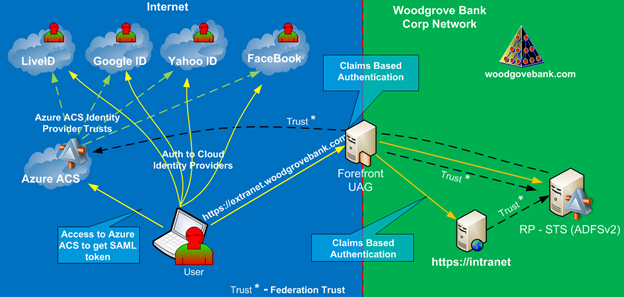
Figure 1: Azure ACS in Federated WebSSO
In this scenario, our partner organization users access claims based applications published by our organization UAG servers. The partner users provide security tokens issued by the partner controlled Identity Provider to our AD FS v2 published by the UAG server. This configuration is the most common federated access scenario, and UAG works very nicely to make it all happen.
The ultimate goal of such configuration is to provide a SSO experience to the end user and never ask them for additional credentials or any type of questions. There are two main areas that must be properly configured to accommodate SSO. The first one is part of the partner organization configuration. Their IdP must be able to authenticate the user on their internal network via SSO. This is easily done if IdP is using AD FSv2. As part of the same AD Forest, it will authenticate internal users via Windows Integrated Authentication and will issue the required security tokens. The second part in this configuration is to configure Home Realm discovery. RP-STS residing on our network (woodgrovebank.com) is probably acting as IdP for internal users, or it might have more Federated trusts with other IdPs. The proper configuration of Home realm discovery is important in Federated configurations so that users are not confused where they need to authenticate and that they might not need to see other partners in your organization. Home realm discovery can be configured via multiple ways and is a topic of its own. We will cover it sometime in future updates to this paper or via a separate article.
Figure 1 shows the overall topology for federated application publishing. If you are familiar with all previous topologies, then you can see how this will work, as it is pretty much an extension on all the previous configurations. Let’s take a look via Figure 2 at the high level authentication flow.
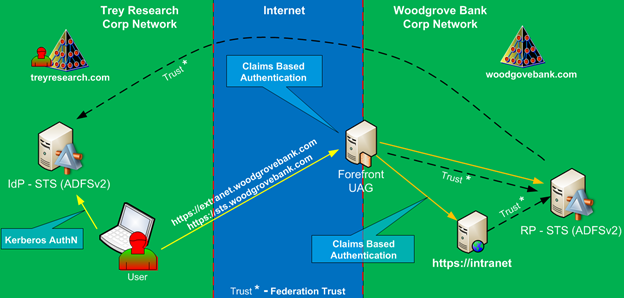
Figure 1: Federated WebSSO Components
- First, the remote user will try to access the application published via the UAG server. Since the application is configured to work over claims-based authentication, it will redirect the browser to its RP-STS.
- RP-STS can be published on the same UAG trunk as our application. This trunk must not use internal AD for authentication. It must be configured as AD FS proxy trunk with RP-STS as the AD FS server behind it – i.e. it must be acting as a relying party. The user will contact RP-STS to get the security token for our target application. This is when Home Realm discovery takes place. If Home Realm Discovery is not configured to automatically redirect this user to his own IdP, then he/she will be prompted to choose his IdP from a list of configured trusted IdPs.
- During this step, the browser is redirected to his IdP, and it will try to request a security token for RP-STS. IdP-STS and RP-STS have a trust relationship, and, based on the conditions of this relationship, the IdP-STS will issue a security token to the user.
- This token will be posted back to the RP-STS, where it will be evaluated and based on the configured rules, and transformed into a new security token with a new set of claims suitable for consumption by the target application.
- The token generated by the RP-STS is redirected back to the user computer, and then, in steps 6 and 7, this token is posted back to the target application. The application will make its authentication and authorization decisions based on the claims presented in the token.
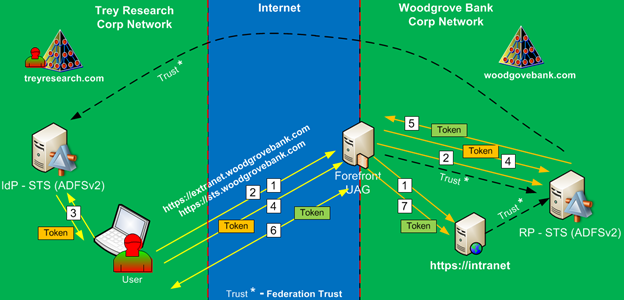
Figure 2: Federated WebSSO Authentication Flow
This topology is an extension of the third topology we discussed in this paper, (Authentication to UAG Portal via Claims Based Authentication and accessing internal claims based application,) and all of the specific configuration related to the UAG and AD FS server are generally the same as in that configuration. The main differences are related to the more complicated Home Realm Discovery configuration and configuration of the partner IdP-STS.
In article “UAG and AD FS are Better Together – UAG as AD FS Proxy” we explored how user authenticates to UAG portal via claims based authentication and then accesses claims based application published via UAG portal. But what if published application does not support claims based authentication, after all how many applications out there that do? Fortunately, UAG is capable to publish and provide SSO experience for non-claims based applications as well. The caveat here is that they must support Kerberos authentication. If you remember this “UAG and ADFS are Better Together– Strong Authentication” topology where we provided access with strong authentication, we configured KCD authentication between UAG and AD FS server. In this topology the configuration is slightly different but concept is the same. Instead of doing KCD between UAG and AD FS, we’ll need to configure KCD between UAG and the target application.
UAG is smart enough to transition from the claims based authentication and request Kerberos ticket from AD Domain Controller on behalf of the user. During application configuration you’ll need to specify what claim you’d like to use as a leading value to get the Kerberos ticket. UPN is a good choice. Also, the proper SPN must be configured in AD for the target application.
Figure 1 shows main aspects of this configuration and Figure 2 provides high level authentication steps of how this works. It is very similar to the previous configurations, just in slightly different order.
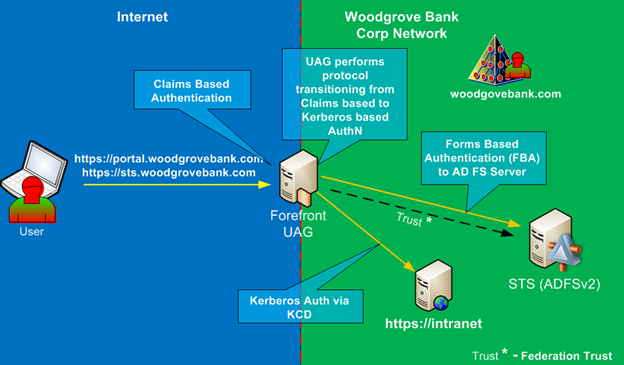
Figure 1
- First, user must authenticate to the portal with SAML token, this is done via authentication to the backend AD FS server.
- When user tries to access published application that was configured with Kerberos Authentication, the UAG server will contact AD Domain Controller and will get Kerberos Service ticket for the target application. It will use the claim value that was configured with this application in its request to Domain Controller.
- Then UAG will send Kerberos ticket to the target application. Application will use the Kerberos ticket for authentication and authorization decision.
- If authentication was successful target application will allow access to the end user.
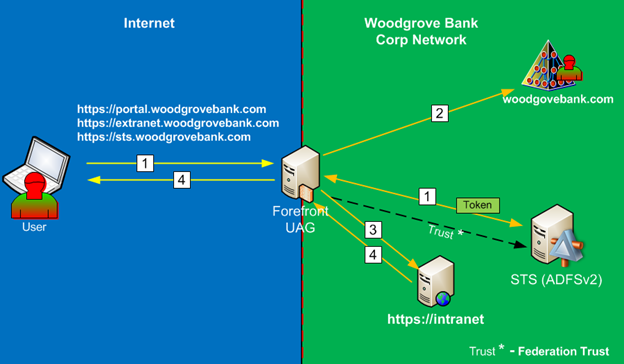
Figure 2
This configuration has similar constraints as was discussed in topology with Smart Card authentication, they relate to the Kerberos constraints. In this configuration application servers must reside in the same Active Directory Domain as UAG server (obviously that means that UAG must belong to AD domain) and the user account must be in the same Active Directory Forest as UAG server as well. Also, there are requirements on the Domain and Forest Functional level, it must be at least at Windows 2003 level.
Today we will discuss a solution that provides the following functionality: You what to require your company external users to use strong AuthN when they access 3rd party trusted claims based applications. These applications can be hosted in the Cloud or by Partner organization.
The description of this topology is a mouthful, but that is exactly what this topology provides to us. It is really an extension of the second topology with addition of federated Resource Provider components. Figure 1 shows this topology.
In many situations you want to allow your remote users to be able to access claims based applications published by your business partners. So the critical question is how do you want to authenticate your remote users against IDP STS? Business partner would usually have RP STS which will issue security tokens for application access. Your user identity does not come from RP site of the equation; it comes from your side. If you want to increase the security, and in the current day and age it is becoming a requirement, your remote users must use smart cards before they can gain access to the IDP STS and receive their initial security token.
First, remote user will try to access partner application which will redirect them via their RP STS back the IDP STS Federation Service. IDP STS external URL is published via UAG and it will require smart card authentication. User authenticates to UAG, receives their security token from internal IDP STS and redirects it back to RP STS and then gains access to the partner application.

Figure 1
Figure 2 shows authentication traffic to for this configuration.

Figure 2
- First, remote user will try to access application published by the Partner organization or by the Cloud Application provider.
- Application will redirect user browser to its own STS (RP-STS). RP-STS will need to perform a home realm discovery. At this time user will be automatically or manually redirected to his own IdP-STS.
- Since in this situation, the IdP-STS is published via UAG on the a trunk that requires certificate authentication, the user will be prompted to authenticate with his Smart Card. The authentication will be done against his corporate AD.
- When UAG authenticates the user, it will use Kerberos Constrained Delegation to authenticate to the IdP-STS, and those providing SSO experience to the user. IdP-STS will authenticate the user and will issue Security token for RP-STS.
- User browser will receive the token from IdP-STS and post it to the RP-STS.
- Finally, RP-STS will take token issued by IdP-STS, it will evaluate it content and based on its own rules, will create its own security token. Claims in this token might be the same as what was issued by IdP-STS or they can be transformed according to specific business rules. User browser will receive the final token from RP-STS and will post it to the target application. Application will authenticate the user and proceed with its logic.
As we can see, this configuration topology provides a powerful way to increase remote user security and it did not require any type of special modifications on the part of the Resource Provider organization. For all they care, the initial authentication by the end user was done via any type of authentication mechanism. It gives a powerful and flexible way to security managers to increase their organization security posture and the same time provide access to remote applications over which they have no direct control.
In previous topologies (1 and 2) we did not expose AD FS server to the outside users as primary form of authentication. This topology will do this. One of the benefits of using UAG server in combination with AD FS is that it can now act as gateway or proxy server to the internal AD FS server, in fact UAG can now be configured as the relying party with AD FS server and accept SAML token for user authentication.
Figure 1 shows topology with AD FS acting as main authentication directory and providing access to internal claims based applications.
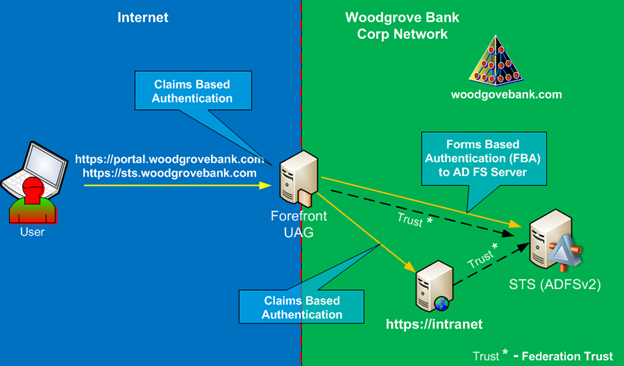
Figure 1
With this configuration UAG trunk is configured to use AD FS for authentication, it passes you all the way to the AD FS server, which challenges you for credentials, in this case it will prompt to provide username and password. AD FS issues security token to the user and it is presented for authentication to the UAG server. UAG server grants access to the UAG portal based on the security token issued from the trusted IDP STS – our internal AD FS server. Figure 2 shows how UAG trunk and published applications configured with different authentication providers.
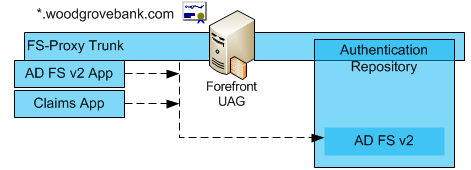
Figure 2
When user tries to open published application, the user will obtain a new security token from the IDP STS, specific to this application.
Figure 3 shows authentication traffic to access the UAG portal and Figure 9 shows how user will access published claims based applications via UAG portal.
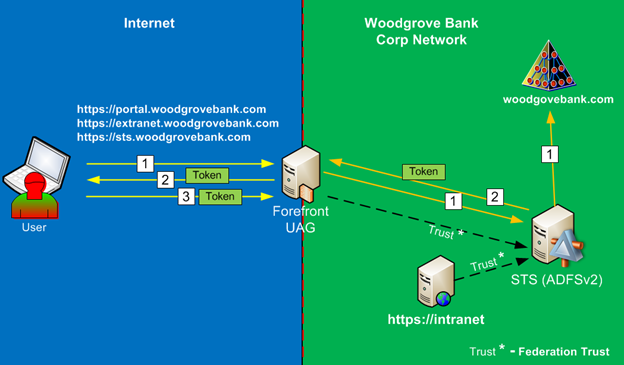
Figure 3
- The remote user attempts to access Forefront UAG portal. Since the UAG trunk is configured to use AD FS as its authentication provider, the Forefront UAG redirects the web browser request to the AD FS (IdP STS) server to authenticate the user. During this step, the IdP STS server might show the home realm discovery page to user (not shown in this diagram) on which he/she must choose the organization to which they belong; in this case, it would be Woodgrove Bank, but since this is a WebSSO configuration, the IDP STS will not show home realm discovery page. The IdP STS must authenticate the user. Depending on how it is configured, it might present user with AD FS Forms based authentication page or it might prompt with Windows authentication pop-up dialog box. The remote user provides credentials and authenticates using his/her own AD DS credentials.
- After successful authentication IdP STS creates security token with claims and it is transferred to the user.
- User is silently redirected and automatically authenticated to Forefront UAG using the security token created by the IdP STS server. User will see UAG portal with applications that this user is authorized to access. It is important to note, that authorization is done via claims and not via traditional windows security groups. In this configuration UAG did not authenticate the user against AD, it authenticated user solely based on the SAML token, and as such, the authorization decisions must be made based on the content of SAML token. Thankfully, Forefront UAG is smart enough to perform such authorization decisions.
After user authenticated to the portal he might decide to access published application, after all, why access the portal if not using applications?
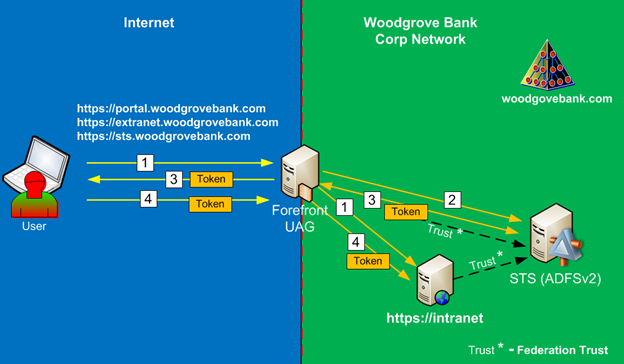
Figure 4
- The remote user attempts to access the published claims based application using claims-based authentication in one of two ways, listed below. Regardless of the mechanism, target application will redirect the user to its trusted Resource Provider STS, in our case it is IdP STS.
- By accessing the Forefront UAG portal and then clicking the published application (this is the follow up procedure to the previous diagram)
- Or by accessing the published application directly using the alternate access mapping name (if application was published that way). If this is the case, the preceding steps in the previous diagram might take place as well, but user will not see the UAG portal, he will be taken straight to the published application.
- Forefront UAG redirects the web browser request to the IdP STS server to authenticate the user. Since user is already authenticated to IdP-STS when he authenticated to UAG portal, he will automatically re-authenticate to it with current session cookie.
- IdP STS creates security token with claims for published application and it is transferred to the user.
- User is silently redirected and automatically authenticated to the published site, after which the site appears.
By using UAG as the front end secure access point we are actually able to simplify AD FS infrastructure. In most situations, for Internet facing deployments, AD FS would deploy Federation Proxy server, which authenticates users on behalf of the internal AD FS server. With this configuration UAG server act as the front end gateway to the internal AD FS server and it is publishing AD FS authentication pipeline via its application publishing mechanism.
At this point it would be a good time to mention what type of UAG Portal features are not available if UAG trunk is configured as relying party to AD FS server. The first one is important to mention because it relates to the user password management. When UAG trunk is configured with AD authentication, it is capable to provide the following two important functions for our remote users:
- Password expiration notification. This is configurable on the trunk usually with 7 days threshold. If user password is about to expire, UAG will notify the user about it and allow to change it to a new password.
- Password change. After user authenticated to the UAG portal, he can always change password via this function. So if remote users are never come on site and they have no way to change their AD passwords via normal mechanism, then this is pretty much the only mechanism for self-password management.
With UAG trunk configured as relying party to AD FS, it never authenticates to AD. AD FS server authenticates user to AD and provides SAML token to UAG for authentication. UAG portal will never know if user password is about to expire and it is not capable to change user passwords because it is not configured with AD as authentication provider. Unfortunately, none of the password management functions provide via AD FS authentication, all it does, is authenticating the user. It will not notify the user about pending password expiration, nor does it provide the mechanism for password change. This is important limitation as it might affect overall design of your solution. If you must provide password management to your users, then you must publish UAG portal with AD as primary authentication provider.
There are other UAG features that are not available with AD FS authentication, here is a short list:
- UAG supports only WS-Fed Passive profile
- No Rich Applications publishing with AD FS authentication
- Impact on Office Applications
- Cannot publish applications installed on the AD FS 2.0 server
- No HTTP to HTTPS redirection
- No mobile device access on federated trunks
In the previous post we looked at the most common UAG configuration, with user using username and password for authentication to UAG. In this post we are going to explorer the following configuration – user authenticates to UAG Portal via Certificate Based Authentication (Soft Certificate or Smart Card based certificate) and then access internal claims based application and other types of applications.
Smart Card authentication is becoming a major requirement in many industries. In Federal Government very soon it will be a mandatory authentication mechanism for internal and external logical application access.
AD FS configuration in this topology is very similar to previous topology, but with a few very critical differences. To enable Smart Card authentication, the UAG trunk is configured to require certificate authentication. During certificate authentication, the user will use a certificate from his smart card, it will be presented to the UAG server and UAG server will authenticate user based on the certificate content, usually it is done based on the value of Subject Alternative Name extension UPN value. UPN stands for Universal Principal Name, it is e-mail like value and it is enforced by Active Directory to be unique. UAG will read this value from user certificate and map it against Active Directory user account with the same value. All of this is done via Kerberos authentication and nowhere during this process has user provided his username or password.
Figure 1 shows classic design with Microsoft Active Directory (AD) acting as main authentication directory and providing access to the internal applications using Kerberos authentication and providing authentication to the IDP STS.

Figure 1
So how does user get security tokens from AD FS in this configuration? UAG must be able to authenticate to it on behalf of the user, but user never provided his username and password. It is done via Kerberos Constrained Delegation (KCD). UAG is configured to be able to impersonate authenticated user via KCD and request service ticket from AD and present it to the AD FS server on behalf of the user. AD FS will issue security token to the user and user will be able to authenticate to the claims based application the same way as it was done in the previous topology. Let’s review step-through process again, Figure 2 show us simplified authentication flow.
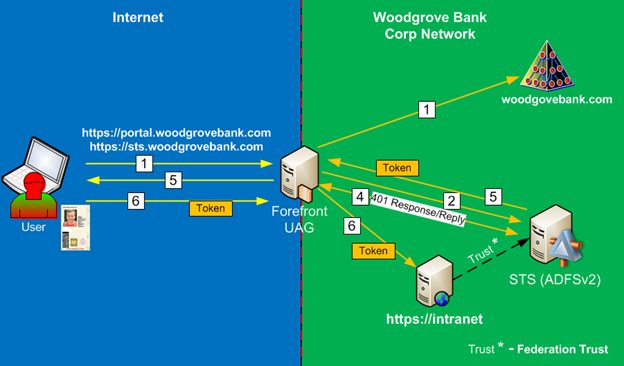
Figure 2
- Remote employee goes to the Forefront UAG portal and authenticates against the AD DS server using Certificate based authentication (Smart Card). They will get access to the UAG portal with published applications based on their security profile.
- When user tries to access claims based application, the application will redirect the web browser request to the AD FS v2 server for user to obtain a security token.
- Depending on the configuration, the AD FS server might show the home realm discovery page to users on which they must choose the organization to which they belong; in this case, it would be Woodgrove Bank, but since this is a WebSSO configuration, the IDP STS will not show home realm discovery page.
- The IDP STS will send back a HTML 401 response message for user to authenticate. Forefront UAG is able to provide a single sign-on (SSO) experience for the user by answering the 401 response with the Kerberos ticket acquired on behalf of the user (KCD).
- The IDP STS server provides a security token (containing a set of claims) to the user.
- The user is redirected to the application and the user’s security token is presented to the application and the application appears.
While this topology increases security of initial authentication, it does lead to some limitations on the back end authentication and limits Single Sign On experience. To provide seamless access to back end applications they must support Kerberos authentication. On top of that, application servers must reside in the same Active Directory Domain as UAG server (obviously that means that UAG must belong to AD domain) and the user account must be in the same Active Directory Forest as UAG server as well. Also, there are requirements on the Domain and Forest Functional level, it must be at least at Windows 2003 level. These requirements put some limitations on the Single Sing On experience. If one of the listed conditions is not satisfied and user tries to access published application, the KCD will not work and he/she will be prompted to provide credentials in the common form of domain\username and password.
Same as in previous topology, the AD FS server does not get exposed to the Internet and you can’t federate it with external partners as RP. This is purely for internal use only, WebSSO solution design.
In previous post I started with introduction for UAG and AD FS integrations scenarios. Today post will discuss the first topology – Authentication to UAG Portal via Forms Based Authentication and accessing internal claims based application and other types of applications.
Many companies want to provide rich application experience to its remote workforce and telecommuters. This is one of the most common configurations for WebSSO scenario where company needs to publish internal applications to its remote users while ensuring that application access is done via secure access mechanism and users are properly authenticated before accessing internal applications. One of the great advantages of using FBA on the UAG trunk is that it will allow us to access all kind of applications on the back end, as long as you can authenticate to them with the same AD credentials used during FBA. It can be NTLM authentication, it can be Kerberos Constrained Delegation or it even can be forms based authentication, UAG can do them all.
Figure 1 shows classic design with Microsoft Active Directory (AD) acting as main authentication directory and providing access to the internal applications using NTLM or Kerberos authentication and providing authentication to the IDP STS. IDP STS server is published on UAG as an application server and it can be authenticated to just like any other internal Web application.
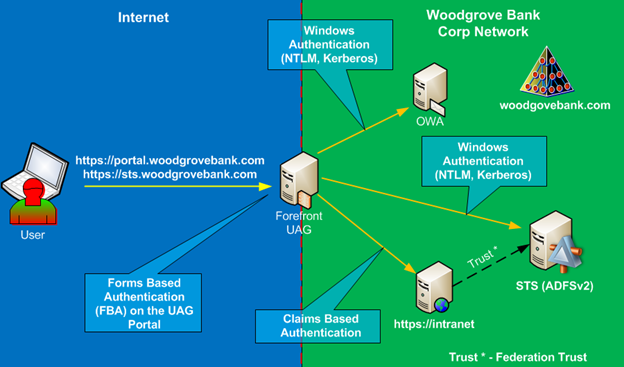
Figure 1
With this configuration users authenticate to the UAG portal with their user name and password and then are able to access any type of application via Single Sing On experience. For Kerberos and NTLM based applications it is accomplished via application configuration just like it was done in the prior versions of UAG. For claims based applications, the UAG is configured with additional authentication provider – AD FS v2, which provides SAML security tokens for authenticated users and allows seamless access to the application. Figure 2 shows how two different applications published on the same UAG portal use different authentication providers. As shown, application that uses Windows Authentication is configured with the same authentication provider as the UAG Portal Trunk, so after user is authenticated to the UAG trunk he/she can gain access to the application without providing additional credentials, experiencing SSO.
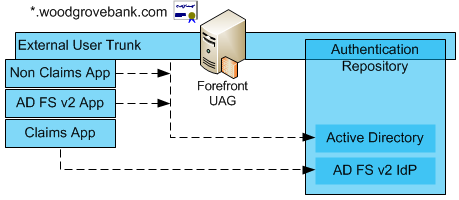
Figure 2
For the claims based application it works slightly different. The UAG is configured with additional authentication provider pointing to the AD FS v2 server. The claims based application is configured to use this AD FS v2 authentication provider. So how SSO is accomplished in this configuration? After configuring application with AD FS v2 based authentication provider UAG will publish another application under the application list. To accomplish SSO, you’ll need to open that application and under authentication tab configure SSO with the same authentication provider as the main UAG trunk (under which this app is published), in this case it is AD. When user decides to access claims based application, it will first authenticate to the AD FS v2 server by using AD credentials, obtain a security token and then present this token to the application. Figure 3 shows simplified authentication flow to the claims based application via UAG.
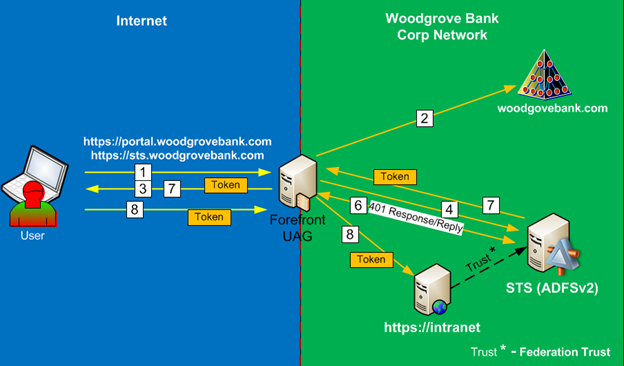
Figure 3
- To access UAG Portal external users will be required to provide Username/password via Forms Based Authentication.
- UAG will authenticate user against Active Directory.
- After authenticating to UAG they will be presented with applications based on their security profile. It will be presented via UAG portal.
- When user tries to access claims based application, the application will redirect the web browser request to the AD FS v2 server for user to obtain a security token.
- Depending on the configuration, the AD FS server might show the home realm discovery page to users on which they must choose the organization to which they belong; in this case, it would be Woodgrove Bank, but since this is a WebSSO configuration, the IDP STS will not show home realm discovery page.
- The IDP STS will send back a HTML 401 response message for user to authenticate. Forefront UAG is able to provide a single sign-on (SSO) experience for the user by answering the 401 response with the credentials previously entered by the user.
- The IDP STS server provides a security token (containing a set of claims) to the user.
- The user is redirected to the application and the user’s security token is presented to the application and the application opens in the user browser.
In this topology, the AD FS server does not get exposed to the Internet and you can’t federate it with external partners as RP. This is purely for internal use only, WebSSO solution design.
Next post will discuss the next topology – Authentication to UAG Portal via Certificate Based Authentication (Soft Certificate or Smart Card based certificate) and accessing internal claims based application and other types of applications.
 Security and Identity in the Cloud